
Plan names in the medical presentation page can now wrap to multiple lines when the name is too long to fit in a single row. The plan name row automatically doubles in height to accommodate the text wrapping, and the content shifts upward instead of downward so the page doesn't get pushed too low.
This is fully automatic — no action needed from the user. If a plan name is long and there's available space, the row expands on its own.
When a plan name is too long, the Plan Name row automatically doubles in height and the text wraps. The page shifts upward to keep everything fitting properly — you don't lose any content at the bottom of the page.
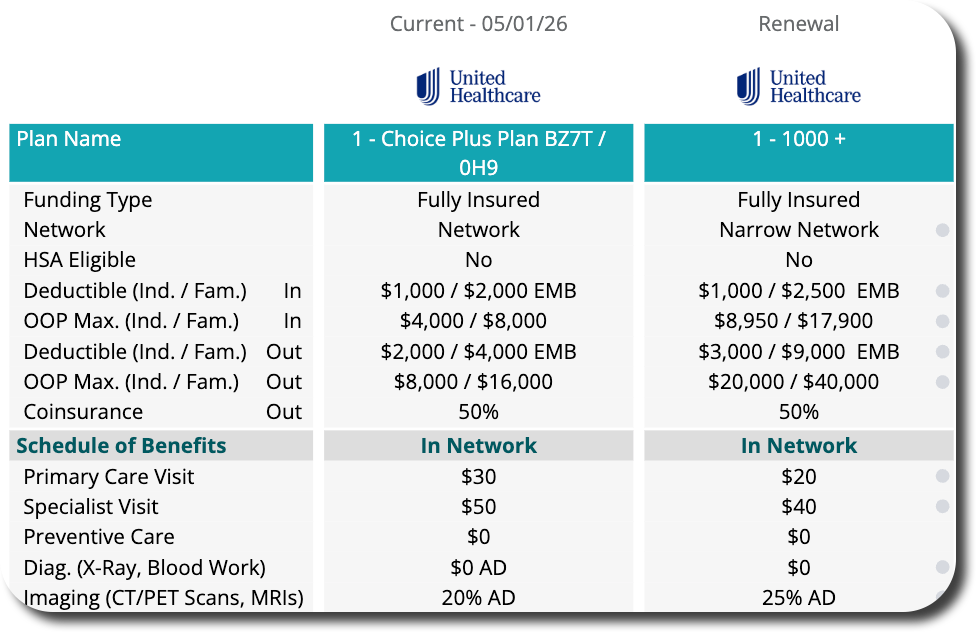
To keep this backwards compatible, this feature only works on the medical plan page if the template has eliminated at least one row.
There are 46 potential rows in the medical presentation template. If a user uses all 46 rows, there is no available space to expand the plan name row. The row can only expand if at least one row is unused — that freed-up space is what allows the plan name to wrap.
In short: All 46 rows used = plan name stays single line. Fewer than 46 rows used = plan name wraps automatically if it's long.
This has been a big ask from Hilb Group and Patriot Growth. Both organizations have been requesting better plan name visibility in presentations, and this update delivers on that request.
This is a visual improvement to the medical presentation — no workflow changes are needed. You don't need to toggle anything on or configure anything. If the plan name is long and there's at least one unused row in the template, the plan name row will expand automatically.