We structured the next two hours exactly around the agenda you sent: your marketing process end to end, small group, the focus items, reporting, implementation, integrations, and pricing. Your checklist, in your order, mostly live in the product.
July 30, 2026 · 2 hoursFully insured medical · 125–500 livesLive in Plansight
Before we start
Ask us anything, anytime.
We know a two hour demo raises questions the moment they occur to you. Scout is our assistant, loaded for this session. Ask privately, at any point, and we will make sure every question gets answered.
1Open the link we drop in the chat. It is restricted to your team.
2Ask anything as it comes up. Your questions are private, nobody else on the call sees them.
3It stays open for about an hour after we finish, so anyone reviewing the recording can still ask.
Ask Scout anything
Link in the meeting chat
Restricted to USI attendees · private · open ~1 hour after
Today · 2 hours
Our agenda for the two hours
40 min
Marketing process, start to finish
Fully insured medical, 125 to 500 lives, walked straight through your workflow. No bouncing around.
10 min
Small group
Under 50 lives: what changes, and the client ready output that comes out of one community rated quote.
20 min
Focus items
Cost summary illustration, a live AI spread on your own documents, and a self funded example. Then questions.
20 min
Reporting
The deep dive: activity, carrier engagement, and the renewal trends you told us you are missing today.
10 min
Implementation
Timeline from kickoff to your first live renewal, what USI owns, and the time commitment.
10 min
BenefitPoint & Employee Navigator
Populate from BenefitPoint, push final decisions back, and hand off to Employee Navigator.
5 min
Pricing
Overall cost and the options on the table. This room is cleared to hear all of it.
5 min
Closing & next steps
Where we go from here.
Agenda · 40 minutes · Live in Plansight
Your marketing process, start to finish
One fully insured medical group, 125 to 500 lives, walked straight through your condensed workflow. Your ancillary lines are already in force in the demo, so today the spotlight is on medical, built the way your first year really begins.
Mode 1 · Build it live
From a blank slate
We start medical from nothing and build it up, the honest picture of year one. You watch the RFP take shape, carriers get invited, and the spreadsheet build itself as we go.
Mode 2 · The cooking show
Quotes already back
Then we switch to a second group where the two week carrier wait is already behind us. Proposals are in, spread, and compared, so you see the finished analysis and client output.
Same for every line
Dental, vision, life, and disability run this exact process. We will keep the walk on medical, and call out where ancillary behaves the same.
Agenda · 10 minutes · Live in Plansight
50
Small group, under 50 lives
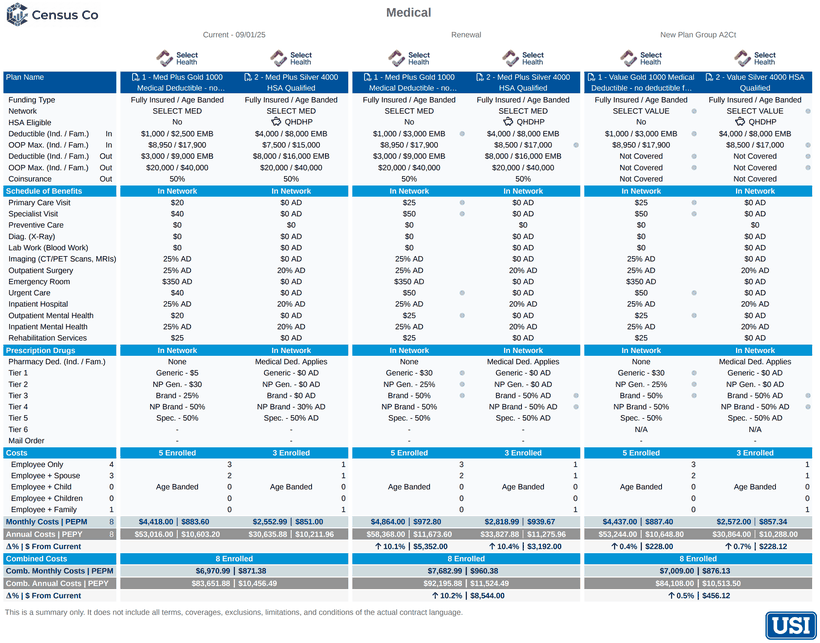
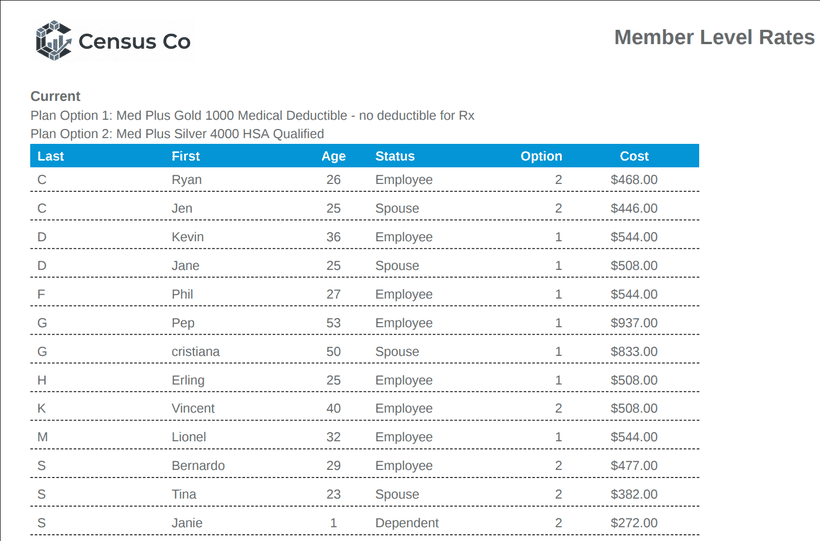
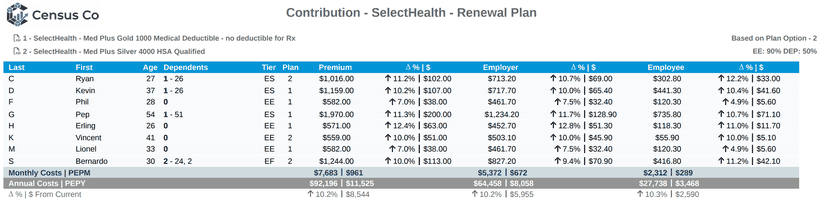
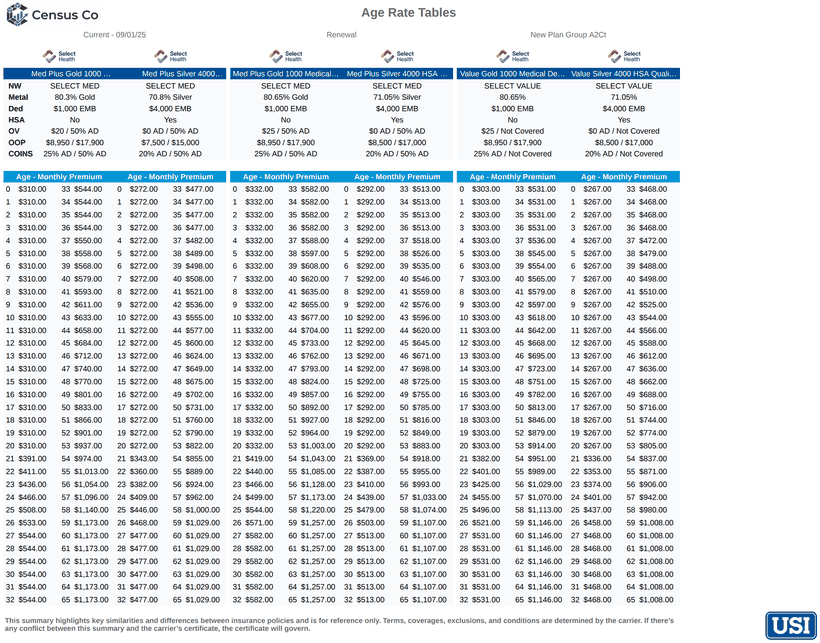
Community rated, quoted in the same RFP flow you just saw, ancillary alongside in one case. Every page below comes out of that one quote, branded and client ready.
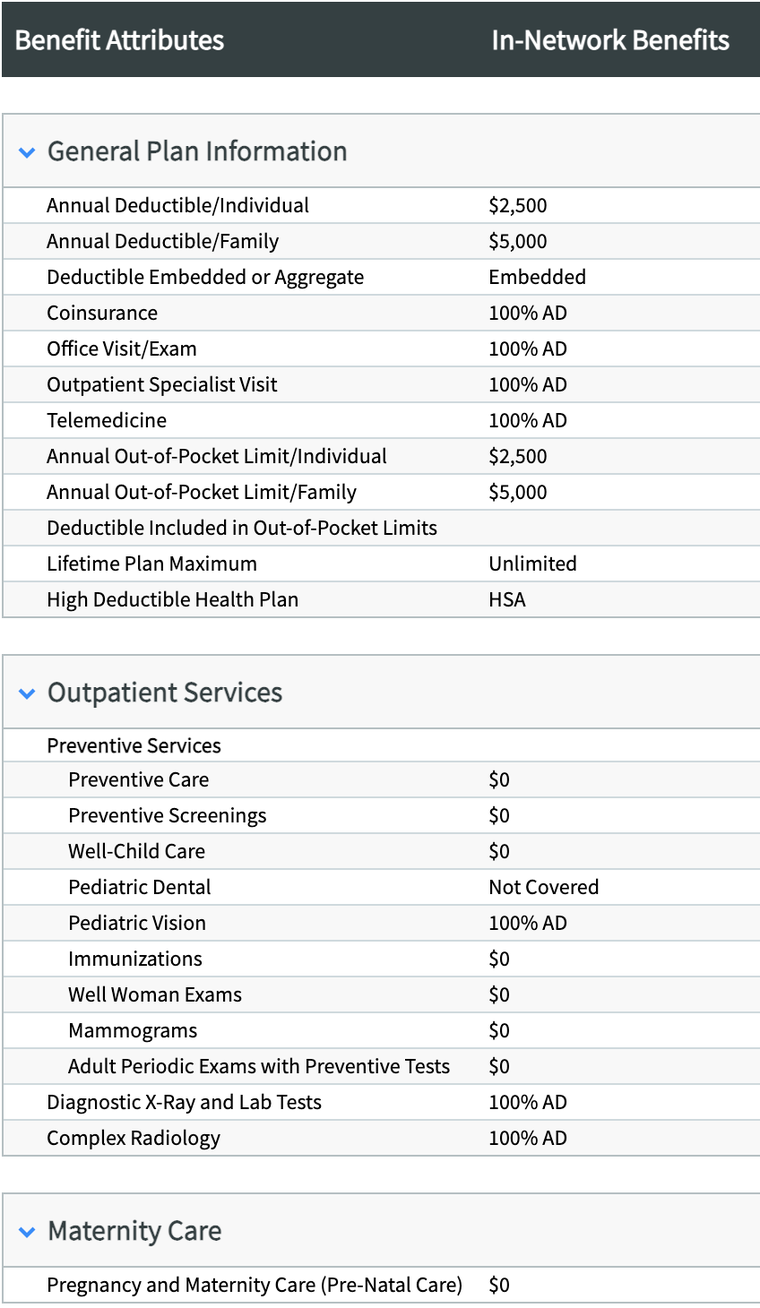
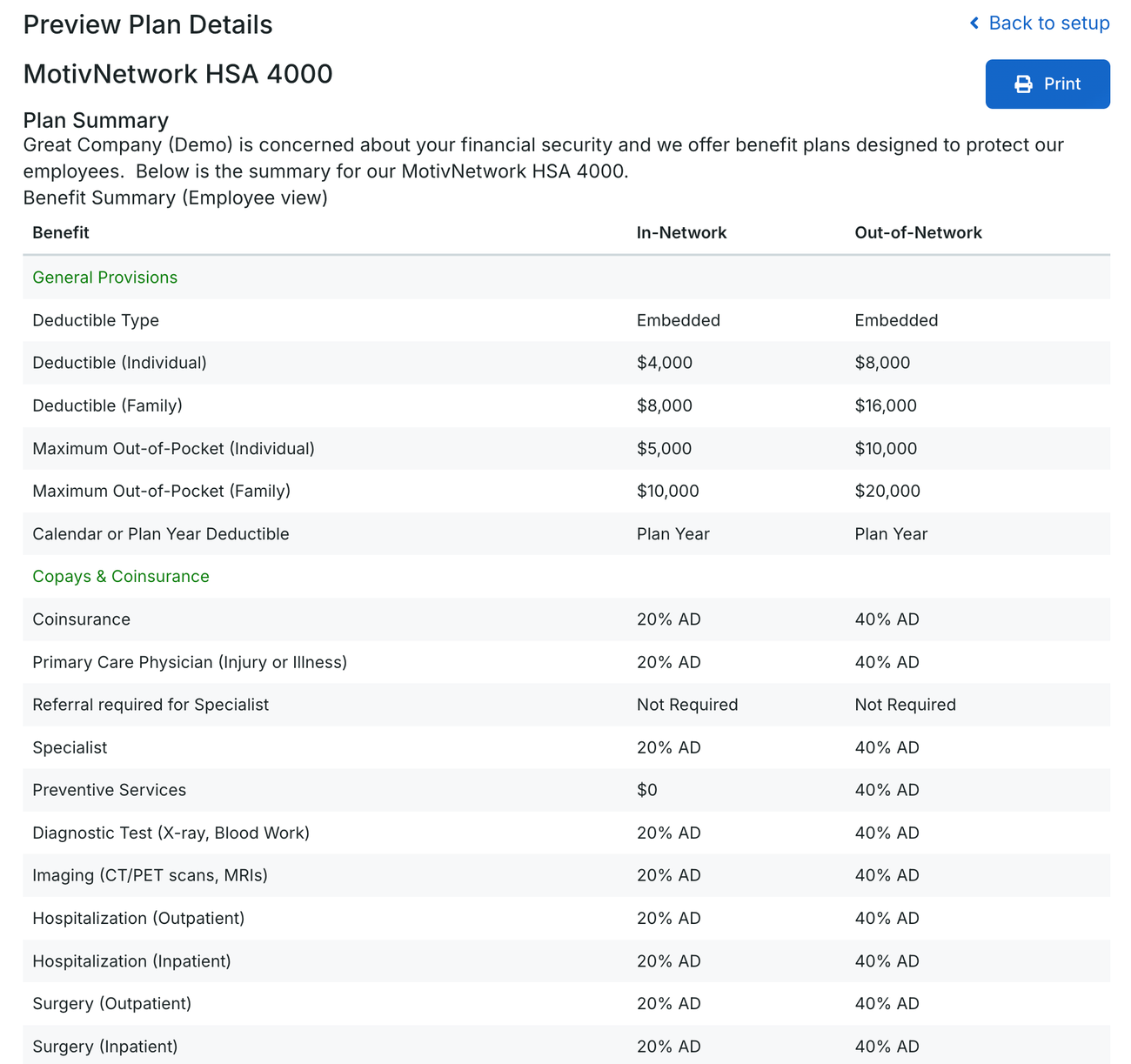
Plan designsCurrent, renewal, and alternates spread side by side on your benefit attributes, with cost and change from current on every column.Member level ratesCommunity rated pricing is per person, so we build it that way. Every employee, spouse, and dependent priced individually.Contribution pagesPremium split into employer and employee dollars for each member, at whatever contribution strategy the client picks.Age rate tablesThe full tables behind the quote, every age from 0 to 65 on every plan, presented with the rest and exportable with it.
Agenda · 20 minutes
Three things you asked to see
01
Cost summary illustration
Every line and the full annual cost, on one page. The all in view a client and a producer can both read at a glance.
Live in-app
02
Live AI spread, your documents
Kim brings a medical summary, Peter an ancillary one, sight unseen. We read them live and send you the Excel afterward to peer review against your template.
Live, on your docs
03
Self funded example
Medical with TPA administration and stop loss, spread and compared the same way as fully insured. One process, either funding path.
Live in-app
Then
We pause here for your questions before the reporting deep dive.
Open floor
Questions
This is the moment to ask anything from the first hour: the workflow, small group, the live spread, or a scenario from your own book. Keep the ones that come up later flowing through Scout.
Agenda · 20 minutes
Reporting, the deep dive
Everything on your reporting list, and where each piece stands today. Captured automatically as your team works, not reconstructed after the fact.
Carrier RFP response data
Quoted, declined, finalist, did not respond. The view you rely on today.
Available
RFP activity: open, closed, status
Who submitted, who is outstanding, by region, OpCo, and office.
Available
Carrier scorecard and per carrier report
Ready out of the box. Carrier performance across the book, then a drill down on any single carrier.
Available
Plan mix by carrier or panel
Percent of plans on a carrier, by region and by line, fully insured or self funded.
Configurable
Renewal trends
Initial vs. final increase, final premium, by funding, carrier, region, OpCo, and size. Shaped to how USI defines a trend, which is a conversation we want to have with you.
Customized
Export, every view
Client ready Excel from the RFP and presentation views, CSV from every reporting view, print ready PDF on the carrier report.
Available
Your data, your tools
Beyond our reports, you can pull any data point into Power BI or Databricks and build on it yourself. The insight layer is yours, not locked in.
Agenda · 10 minutes
Implementation, made simple
Nick Warner, our EVP of Customer Success, will walk the plan: what the timeline looks like, what USI owns, and how much of your team’s time it really takes.
Week 1
Provision & configure
Six steps with your Onboarding Consultant. Your champion and your OC only, so the rest of the team stays on their day job until Week 2.
Weeks 2–4
Train & run live
We show you, you take over, you own it. Hands-on sessions with your full team, real work on real clients. Plan elections push to Employee Navigator and BenefitPoint, no duplicate entry.
Days 30–60
Independent operation
Your analysts confidently run renewals on their own. Standard workflow established across the team.
Days 60–90
Fully adopted
Plansight is your renewal and marketing platform across all target groups.
How much time from USI
Week 1 is your champion and your OC, nobody else. From Week 2, weekly working sessions through Day 60, then bi-weekly to Day 90, plus a monthly check-in with your Account Manager. That is the whole standing commitment.
What USI owns
Your Onboarding Consultant owns the technical execution and your Account Manager stays involved as your advocate throughout. From USI we need group and user data, your integration credentials, and the configuration calls only USI can make, like the benefit attributes on your medical template.
The checkpoints
Day 30 live and running, your team trained and first renewals run. Day 60 everyone working independently. Day 90 fully adopted across all target groups.
Implementation · Week 1
Six steps with your OC
What we set up together before your team joins. Your champion and your Onboarding Consultant, nobody else pulled off their day job.
01
Instance setup
Your Plansight environment is created and configured.
02
Client upload
Your book of business is loaded into the platform, or pulled straight in from BenefitPoint.
03
Product templates
Plan attributes and settings configured to match how you work, including your medical line of coverage template.
04
Presentation templates
Branded client presentation templates built and ready.
05
Carrier distribution
Carrier rep network configured so RFPs route correctly.
06
User setup
Every team member added with the right access level.
Week 1 at a glance
3 to 5 business days. Champion and Onboarding Consultant only. By your first team session, Plansight is ready to run a real client renewal.
Agenda · 10 minutes · Live in Plansight
BenefitPoint and Employee Navigator
Your book flows in, the marketing happens here, and the decisions flow back out. This is what actually lands on the other side.
Both directions
Your book syncs in on a schedule: employers, plans, rates, contributions, eligibility, already populated
The decision pushes back with one click; renewals carry prior contributions forward
Quoting happens here, BenefitPoint stays your system of record.
Both directions
Linked once per employer, then pull census straight across, no spreadsheet upload
When the RFP closes, elected plans push back with design, rates, and benefit summary
Medical, dental, vision, life, and disability.
Also connected: Ideon inbound plan and rate data · A.M. Best daily carrier ratings · Plansight Open API outbound to partner systems · Brite Benefits sold plan data
Agenda · 5 minutes
Pricing
Both licensing options are already in your hands from our RFI response, so let’s make this an open discussion rather than a re read. Everyone in this room is cleared to hear it, so ask anything.
Included in every option
The full platform, every integration at no additional charge, and support. Unlimited users, so no per seat fees, and no carrier side fees.
How it scales
Priced per employer group under management, with volume tiers and a multi year option that locks your rate for the term. At USI’s scale this is an enterprise agreement, built to your actual footprint.
To put a final number on it
Your total group count, which structure fits how USI prefers to budget, and expected document volume. Confirm those three and we issue final pricing.
Agenda · 5 minutes
Your workflow, in one platform.
Everything on your checklist handled in one place, with the work your analysts do along the way becoming the client presentation, always current.
One system
Spread, RFP, carriers, requotes, and the presentation, all in one place. No re keying between spreadsheets and email.
You stay in control
Full control of the spreadsheet and every quote. Edit any value yourself, no gatekeeper.
Built for your scale
Any carrier, any rep, no logins. Enterprise reporting across the whole book, region by region.
Next steps
What would make Plansight the right fit for USI? And where would you like to go deeper from here?