Laura's team gathered input from stakeholders across your organization. We built the next ninety minutes around what they told you, and we will spend most of it live in the product rather than on slides. Today we run it on ancillary, because that is what you asked to see.
August 6, 2026 · 90 minutesRenewal to presentationLive in Plansight
Before we start
Ask us anything, anytime.
Stop us whenever something occurs to you, and we have time set aside at the end as well. Alongside that, Scout is our assistant, loaded for this session. Ask it privately at any point, from the room or from Teams, and we will make sure every question gets answered.
1Open the link we drop in the chat. It is restricted to your team.
2Ask anything as it comes up. Your questions are private, nobody else in the room or on Teams sees them.
3It stays open for about an hour after we finish, so anyone reviewing later can still ask.
Ask Scout anything
Link in the meeting chat
Restricted to Baldwin attendees · private · open ~1 hour after
01
Who we are
Plansight is the only AI application that manages your benefits renewal and marketing workflow.
It brings transparency, consistency, and time savings to every group renewal, and turns your whole book into performance data you can act on.
01
Transparency
Every value traces back to the exact line in the carrier's document.
02
Consistency
Every renewal and every RFP, the same way, every time.
03
Time savings
The workflow produces the presentation. No double entry, no manual rebuilds.
Today · 90 minutes
How we will spend the ninety minutes
10 min
Getting started
Who we are, how to ask us anything as we go, and how the next eighty minutes are laid out.
50 min
The walkthrough, live
What the work produces, the full renewal cycle, and then one case start to finish in the product. Dental, vision, life, and disability marketed together, from setting the baseline through the client presentation and the award.
10 min
Integrations and reporting
Where Plansight connects to the systems you already run, and what the whole book looks like once the work is captured.
10 min
Onboarding and customer success
Jessica McGee on implementation, what it actually costs your team, and what support looks like once you are live.
10 min
Your questions, and where we go from here
Open floor, then next steps through your early September decision and a February 2027 go live.
Renewal and marketing workflow
The work produces the presentation.
Every page your client sees emerges as you move through the Plansight workflow. Nobody assembles these at the end.
As you host your clients' plans
Click to enlarge
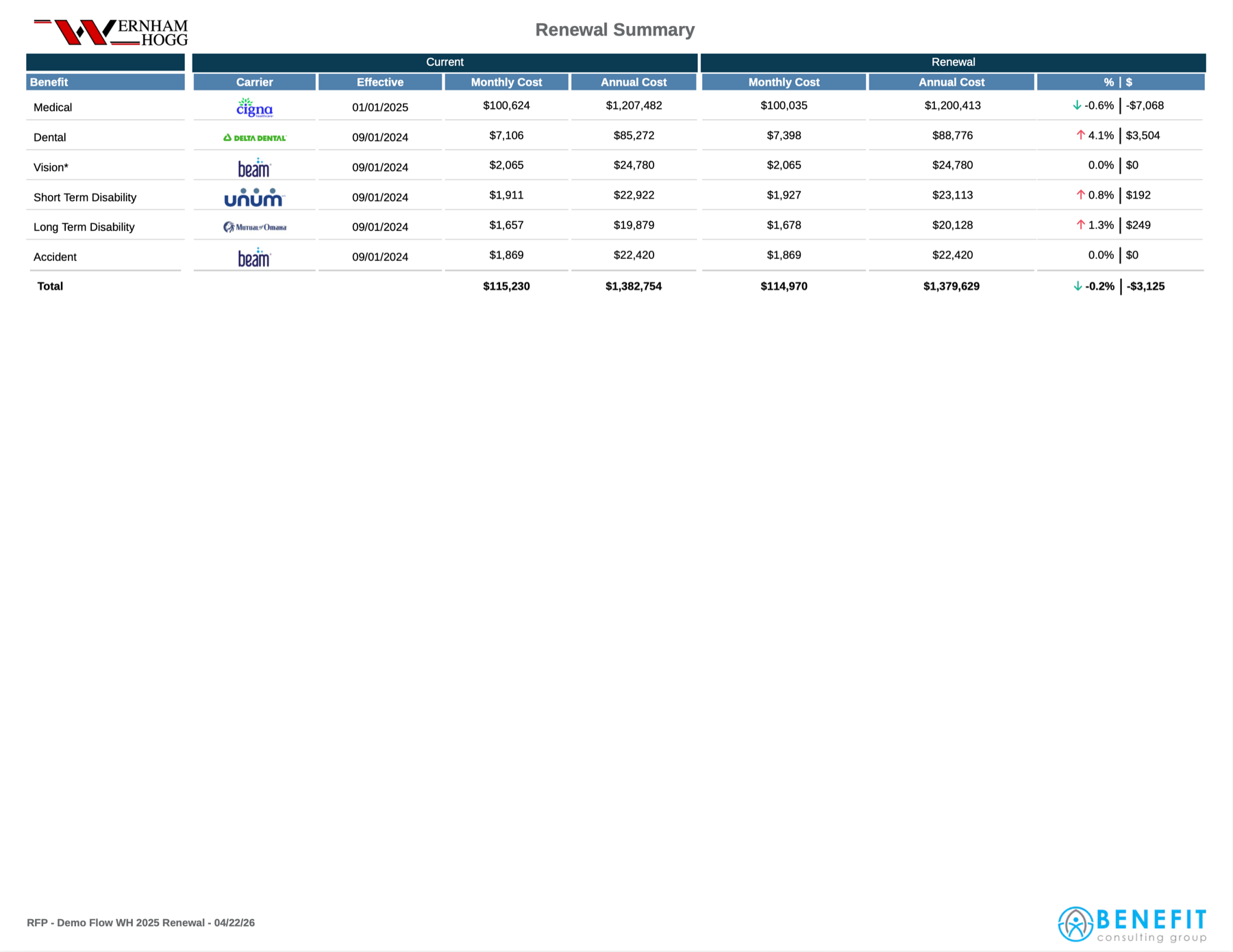
Renewal Summary
The state of the union. Today's benefits and cost, next to what it takes to renew if nothing changes.
As you market to carriers
Click to enlarge
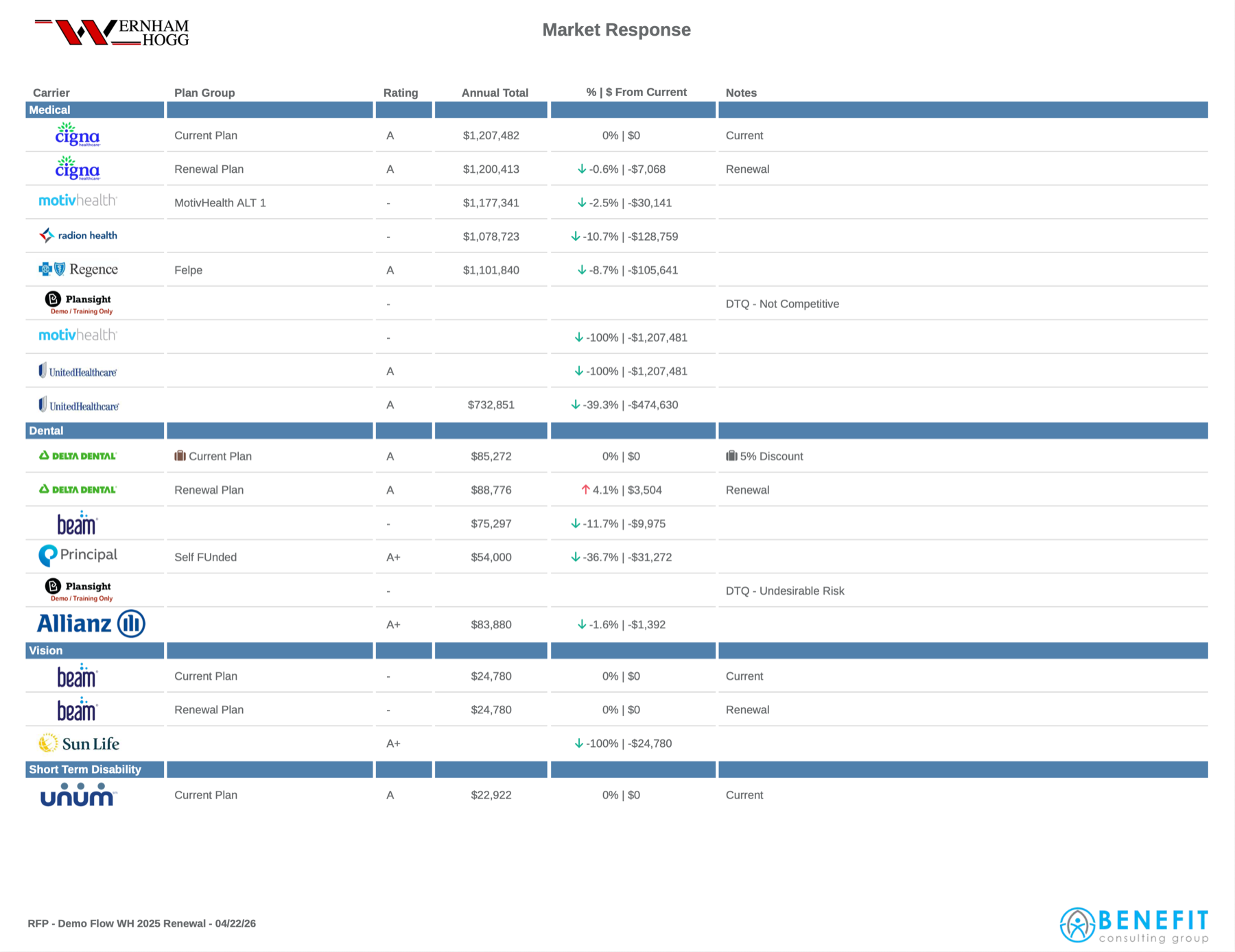
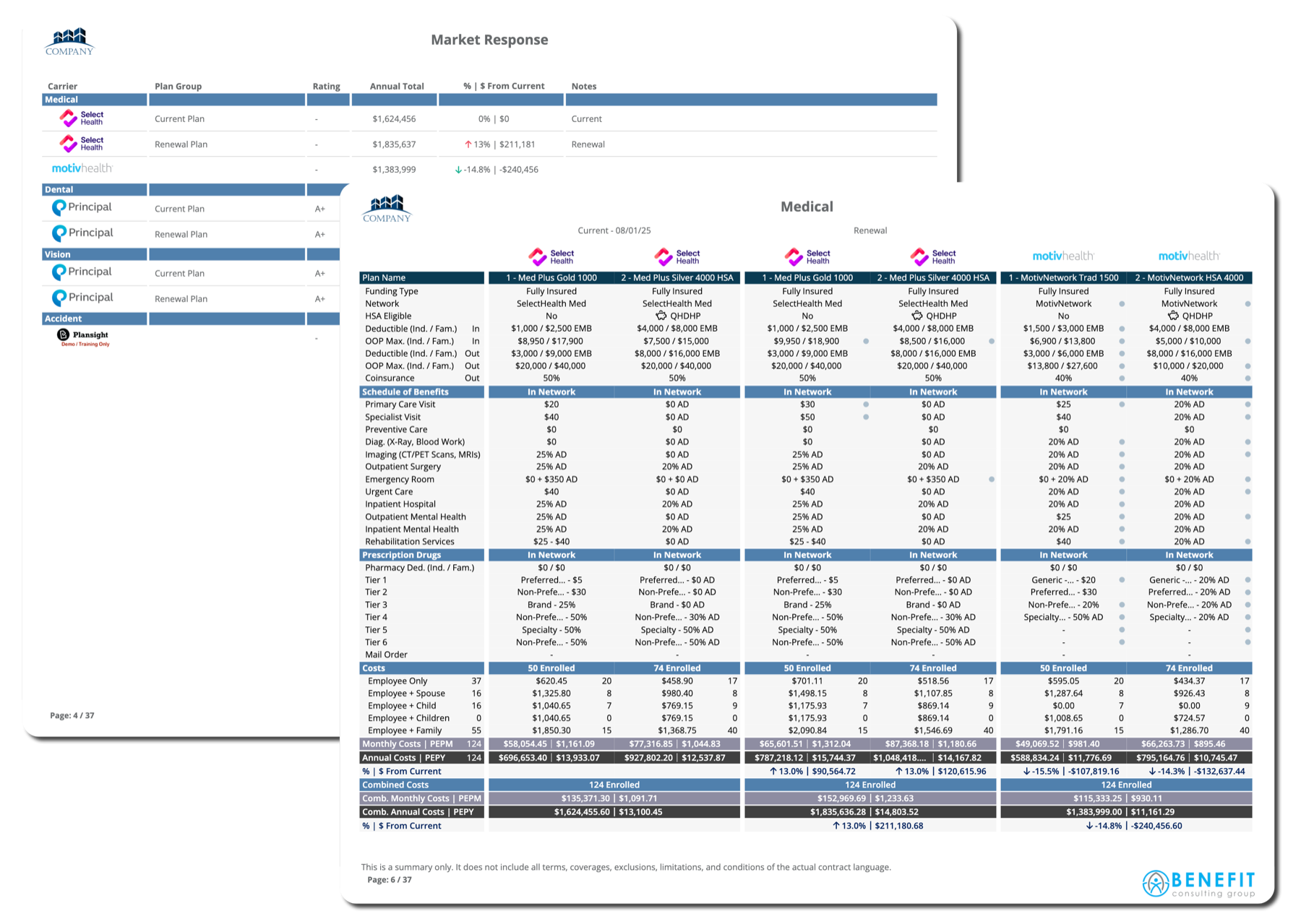
Market Response
Every carrier that quoted, every DTQ, every bid still outstanding. All compared to current, automatically.
As quotes come in
Click to enlarge
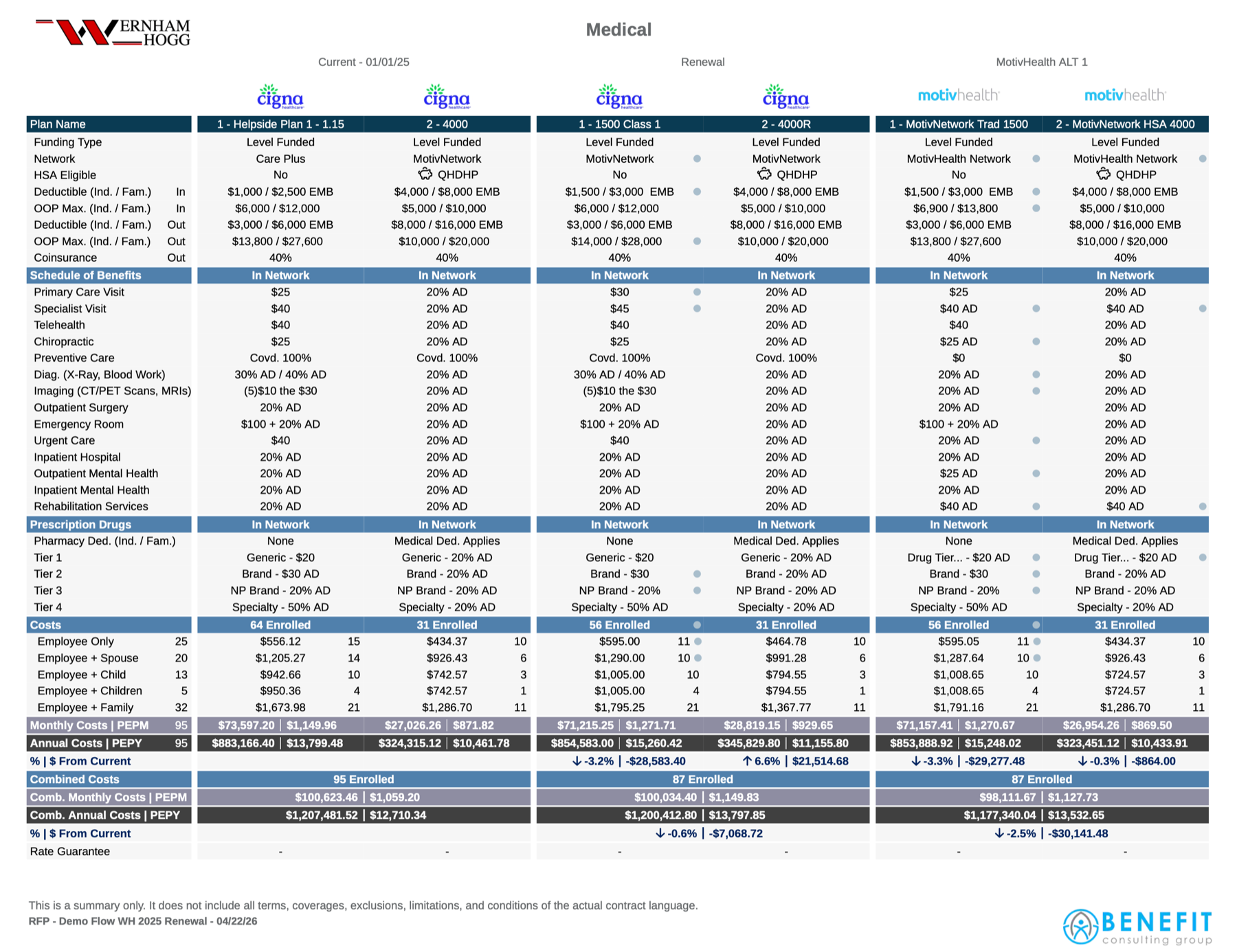
Detailed Plan Design
Each benefit type has a spreadsheet built for it, scaling from three quotes to thirty. Branding, logos, and visible attributes are all configurable.
As you build recommendations
Click to enlarge
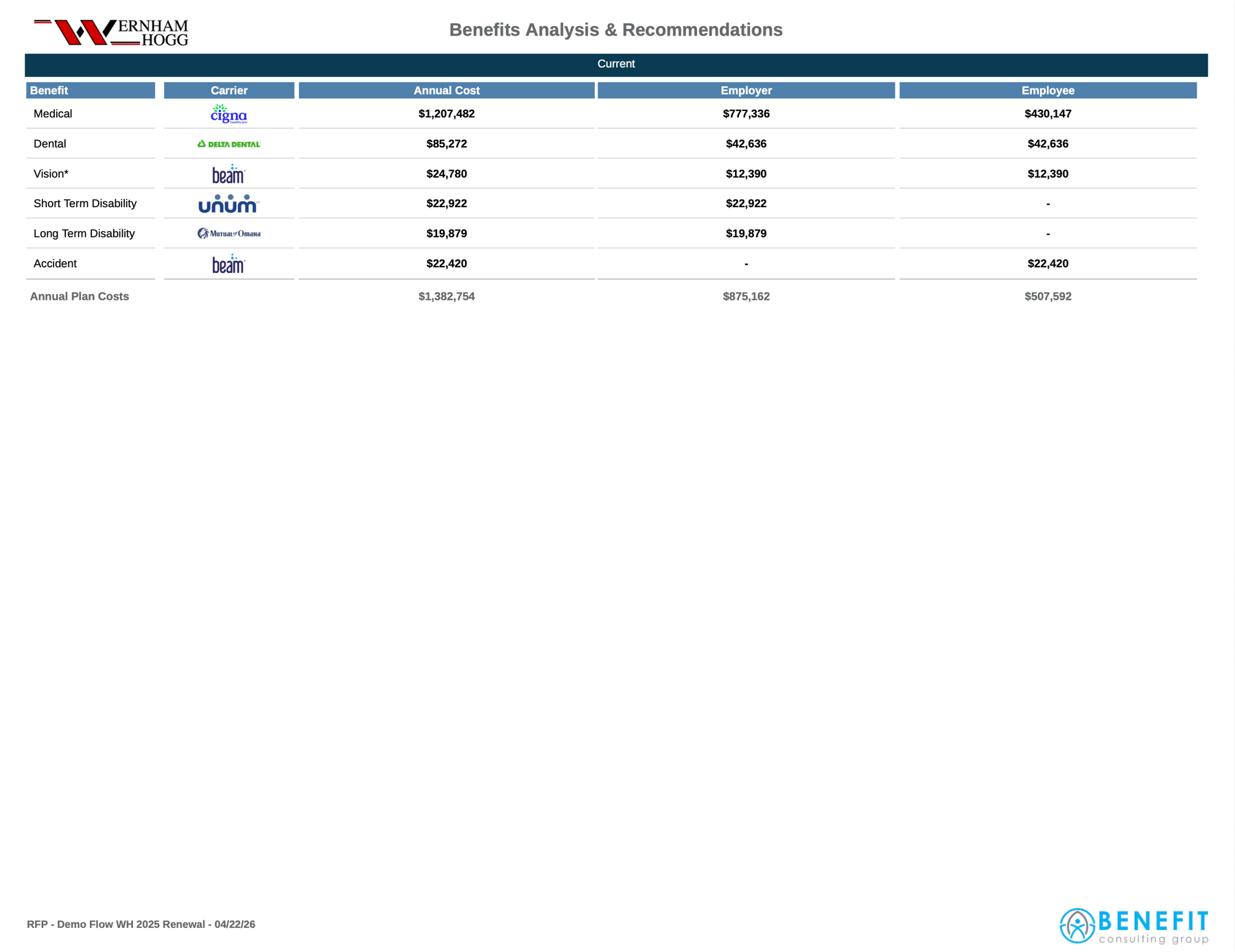
Packaged Scenarios
Each package stands on its own, with its own contribution structure.
CurrentRenewalAlternative
As the story comes together
Click to enlarge
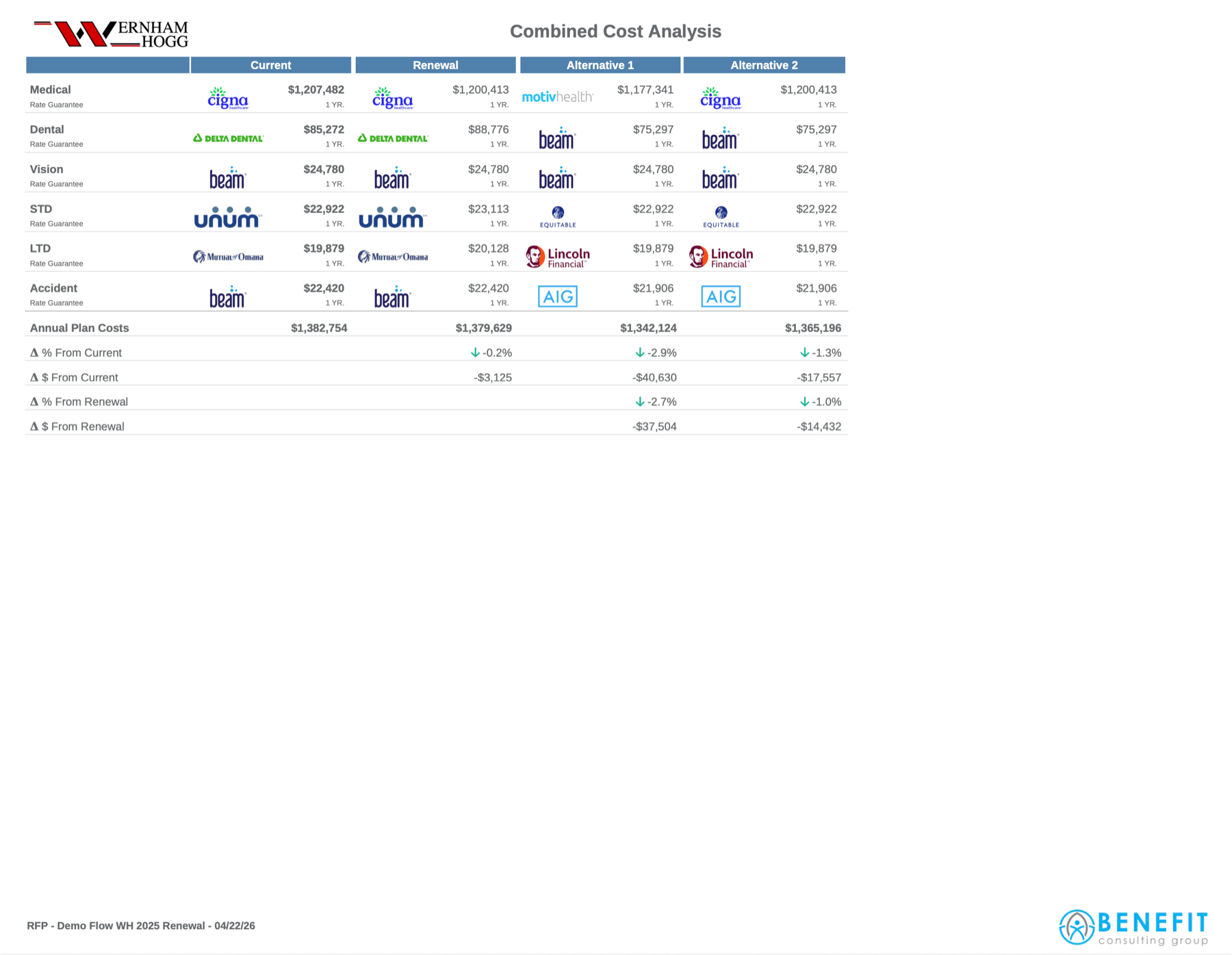
Combined Cost Analysis
Current, Renewal, and every alternative. One page that tells the whole story.
What comes out
Every page exports as a branded, presentation ready PDF and a working Excel. And the same workflow runs your medical book, community rated through level funded, with nothing changing about how your team works.
The full renewal cycle
From plans, back to plans.
Renewals come in and the presentation builds itself. Go to market only when you need to. Either way, elections close the loop and become next year's plans.
1
Current Plans
Plans live on the employer profile with effective and renewal dates.
2Auto
Add Renewals
Drop in the renewal docs. The presentation builds itself.
3Optional
Go to Market
Send the RFP. Quotes flow in, the presentation updates in real time.
4
Elect
Pick the winning plans. They become next year's current plans. Old plans go to history.
Elections become next year's current plans
Going to market
The RFP knows where to go, and who has not answered.
A guided build, a distribution list that assembles itself from rules you set once, and reminders that go only to the carriers still holding a line open.
As you build the RFP
A guided wizard
Basics, benefit types, plan details, documents, distribution, then review and send. You can save and exit at any step and pick the build up later.
As you choose recipients
The list builds itself
Rules are set once per carrier, scoped to a single office or an entire region. When an RFP goes out, Plansight matches every carrier contact against this case and preselects the reps who cover it.
Benefit typeMarket sizeSitus stateOffice and regionEmployee count
After it is sent
Follow-up runs itself
Up to three reminders go out on your cadence. A carrier drops off the moment it answers, tracked per benefit line, so a carrier that quoted dental and still owes vision is asked about vision only.
Reminder 1Reminder 2Reminder 3
When the sequence ends
Then a task, on a person
After the third reminder Plansight opens one task per carrier, assigned to the account manager, producer, or RFP owner. It lists the lines still open and everyone already contacted, and clears itself if the carrier comes through.
Assigned for youClears itself
Set once
Distribution rules and the reminder cadence are configured one time and inherited by every RFP your team sends. Nobody keeps a list of who has responded.
The quote lifecycle
From email to spreadsheet.
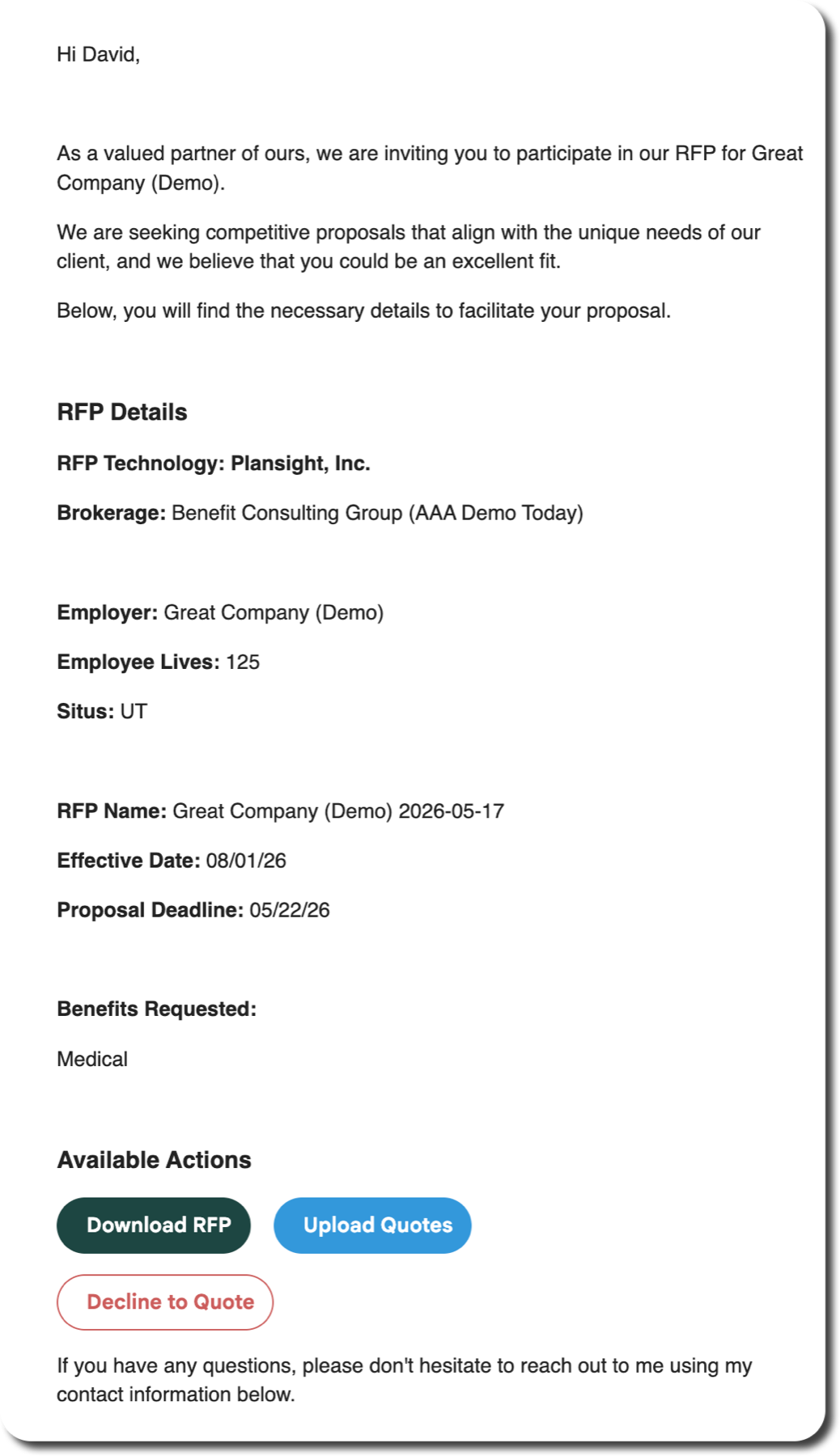
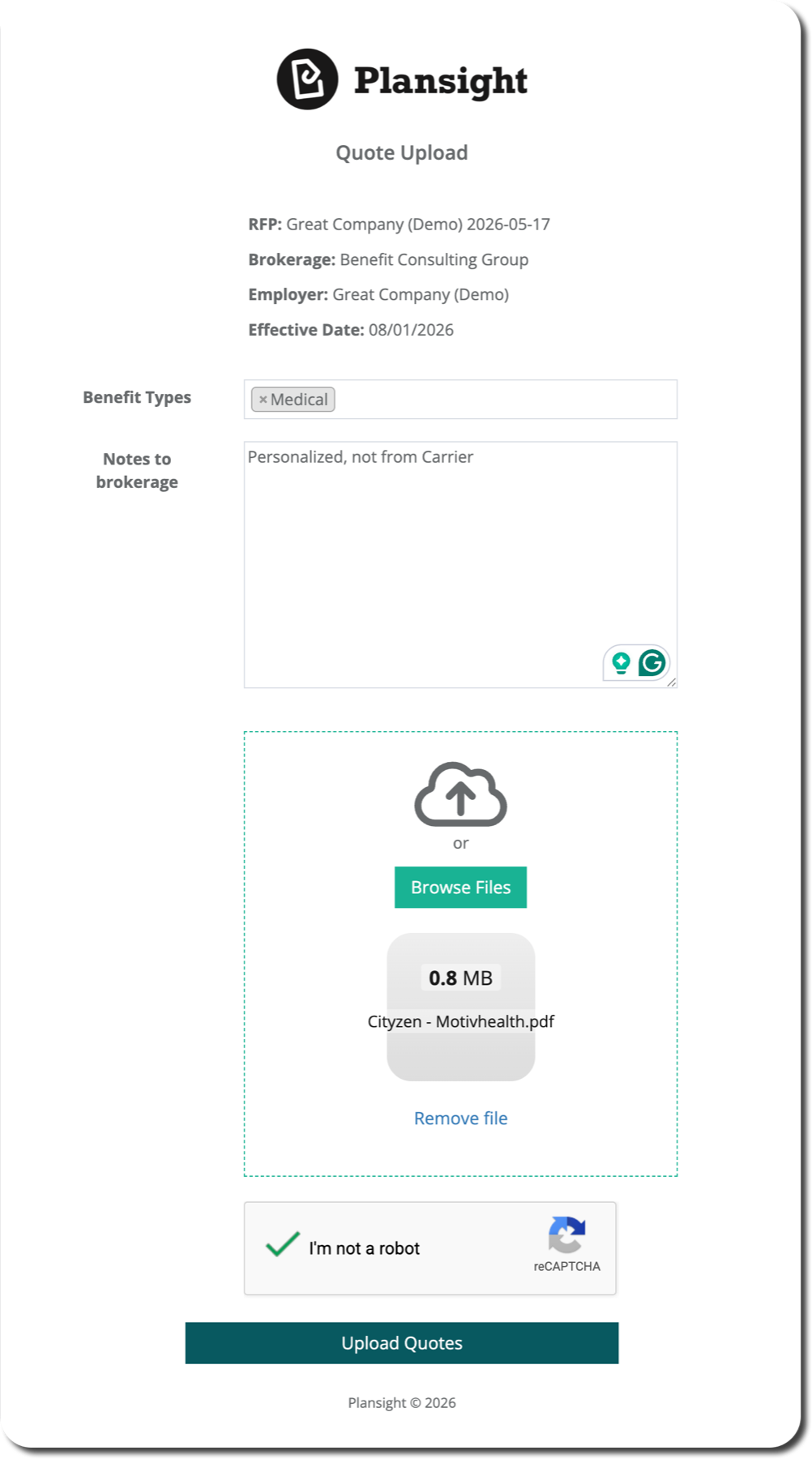
The carrier downloads the RFP from their inbox, drops their quote into the link you sent, and it lands directly in your spreadsheet.
1Email
RFP lands in their inbox
Click to enlarge
2Upload
Drag, drop the quote
Click to enlarge
3Built in
Lands in your spreadsheet
Click to enlarge
The plan library
Three ways a plan gets in. One place it lives.
However a plan reaches you, it lands in the same library, keeps the name you give it, and stays available to your whole team.
Instant
From the rate library
Small group medical quotes generate on the spot, by state and plan year, with no document to wait on.
From the carrier
Read from their own document
Any carrier, across the lines you place every day. AI reads the plan and the rates off the document they send you, and every field traces back to the page it came from.
Any plan you build or receive can be saved under your own name for it, shared with the whole brokerage, and pulled straight into the next case.
And it stays
A saved plan carries its benefits and its rates, and it is there the next time someone needs it. Putting a date range on a plan is optional, so a plan stays available for as long as you want it.
Integrations and reporting
Where Plansight connects
Your book flows in, the marketing happens here, and the decisions flow back out. These connect your own stack. They are not how carrier data enters the platform, so your carrier coverage is never limited by which integrations are live.
Both directions
Benefits agency management
Your book syncs in on a schedule: employers, plans, rates, contributions, eligibility, already populated. The decision pushes back with one click, and renewals carry prior contributions forward. Quoting happens here; your AMS stays the system of record.
Both directions
Employee Navigator
Your benefits administration system, linked once per employer. From there, pull census straight across, no spreadsheet upload. When the RFP closes, elected plans push back with design, rates, and benefit summary. Dental, vision, life, and disability.
Outbound
Plansight Open API
Every data point in the platform is available to your own environment, whether that is Power BI, Tableau, or Snowflake. The insight layer is yours, not locked in.
Also connected
A.M. Best daily carrier financial ratings, surfaced on the Market Response page · Brite Benefits sold plan data · and a partner API for custom data flow.
What you can measure
Reporting, across the book
Captured automatically as your teams work, not reconstructed after the fact. Here is where each piece stands today, stated plainly.
Carrier RFP response data
Quoted, declined, finalist, did not respond, by carrier.
Available
Marketing activity: open, closed, status
Who submitted, who is outstanding, by region, opco, and office.
Available
Time to quote and time to bind
How quickly each carrier actually turns work around.
Available
Win and loss by carrier
Which carriers show up, and which ones convert.
Available
Persistency by carrier
Retention across the panel, year over year.
2027 roadmap
New and moved by carrier, year over year
Where the book shifted, and to whom.
2027 roadmap
On the two roadmap items
The underlying data for both is available through our REST API today. As part of onboarding we will work with your analytics team to stand these up in your own environment, so you are not waiting on the in product release to get the insight.
Onboarding and customer success
Implementation, made simple
Jessica McGee walks the plan: what the timeline looks like, what Baldwin owns, and how much of your team’s time it really takes.
Week 1
Provision & configure
Six steps with your Onboarding Consultant. Your champion and your OC only, so the rest of the team stays on their day job until Week 2.
Weeks 2–4
Train & run live
We show you, you take over, you own it. Hands-on sessions with your full team, real work on real clients rather than sample data.
Days 30–60
Independent operation
Your analysts confidently run ancillary renewals on their own. Standard workflow established across the team.
Days 60–90
Fully adopted
Plansight is your placement and marketing platform across all target groups.
How much time from Baldwin
Week 1 is your champion and your OC, nobody else. From Week 2, weekly working sessions through Day 60, then bi-weekly to Day 90, plus a monthly check-in with your Account Manager. That is the whole standing commitment.
What Baldwin owns
Your Onboarding Consultant owns the technical execution and your Account Manager stays involved as your advocate throughout. From Baldwin we need group and user data, your identity provider configuration for SSO, and the configuration calls only Baldwin can make, like the benefit attributes on your ancillary templates.
The checkpoints
Day 30 live and running, your team trained and first renewals run. Day 60 everyone working independently. Day 90 fully adopted across all target groups.
Implementation · Week 1
Six steps with your OC
What we set up together before your team joins. Your champion and your Onboarding Consultant, nobody else pulled off their day job.
01
Instance setup
Your Plansight environment is created and configured.
02
Client upload
Your book of business is loaded into the platform through a one time import, or pulled straight in from your agency management system where a connection exists.
03
Product templates
Plan attributes and settings configured to match how you work, across each ancillary line of coverage.
04
Presentation templates
Branded client presentation templates built and ready.
05
Carrier distribution
Carrier rep network configured so RFPs route correctly, including your regional and local carriers.
06
User setup
Every team member added with the right access level, by region and office.
Week 1 at a glance
3 to 5 business days. Champion and Onboarding Consultant only. By your first team session, Plansight is ready to run a real client renewal.
Not from us
What it sounds like once it is running
This came in unsolicited on July 31, from a broker doing the same ancillary and medical marketing work your teams do.
Kendra Birkes · Insurors of Texas
Plansight has been such a relief when it comes to marketing and presentations for clients. The RFP and marketing process is so easy and the presentations are clean and crisp for a client to be able to read. Along with the developing AI functions for the presentations, it just makes marketing such an easier task for us on a day to day basis.
All in all, it has helped me out tremendously and the service from the Plansight team does not go unnoticed. And the bot, I love the bot! It has helped me realize and update things that I may not have known before.
Open floor · 12 minutes
Your questions
Everything you wrote down. The workflow, the regional carriers, accuracy, implementation, or a scenario from your own book. Anything we do not get to, keep sending through Scout for the next hour.
Baldwin
3 minutes
One platform, any carrier.
Renewal, marketing, and proposal development in one system, with the work your teams do along the way becoming the client presentation and the national reporting, always current.
No integration treadmill
Any carrier, national or regional, the day you have the document. Nothing to certify, nothing to maintain.
Your team stays in control
AI reads the documents, your broker approves every quote before it goes anywhere. Every number traces to its source.
Built for a national rollout
One workflow across every region, with the reporting to see whether it is actually being adopted.
From here
Your decision in early September, and a February 2027 go live. That gives us a five month runway for a proper regional rollout. What would you need to see between now and then to be confident?